Appearance
Freeplays
Introduction
Operators grant freeplays as an incentive or marketing measure. The hizi.io RGS assigns freeplays. The hizi.io RGS revokes freeplays. The hizi.io RGS also reports freeplays to the operator.
Prerequisites
The game must support the getGameConfiguration call. The operator uses this call to query available stakes.
Note: The hizi.io RGS supports freeplays only in Real money mode.
Implementation notes
An operator activates freeplays for a player. The operator grants freeplays to the player. The game then receives additional information. The game receives this information in the response to the connect call. The game sends the connect call to the hizi.io RGS.
        "freePlayInfo": {
                "used": 0,
                "granted": 5,
                "won": 0,
                "isLast": false
        }
The freePlayInfo section describes the active freeplay package. An active package is a package that the player is currently using. This section shows the number of spins used. This section shows the number of spins originally granted. This section shows the total win so far. This section shows the isLast flag. The isLast flag shows if the package is finished. A package is finished when the player uses all its free spins.
        "freePlaysAvailable": [{
                "currency": "EUR",
                "stake": 100,
                "count": 5
        }]
The freePlaysAvailable section describes the available packages. This section groups packages by stake. An operator can grant multiple packages to a player.
The hizi.io RGS also returns this information with every APIV2 request. Examples include startGameRound and collectWin.
Using a freeplay
When free spins are available for the stake in the game, the game must set an additional flag in the startGameRound call. This flag tells the hizi.io RGS to use an available free spin. The example below highlights the additional parameters in red.
                "debitInformation": {
                        "debitAmount": "100",
                        "currency": "EUR",
                        "useTicketInfo": {
                                "useTicket": true
                        }
                }
In the response to this call, the game receives updated freePlayInfo and freePlaysAvailable information.
Note: If the free spins are not available or already used, the hizi.io RGS returns an error.
Testing of freeplays
Use the Freeplays section in the staging backoffice to test freeplays.
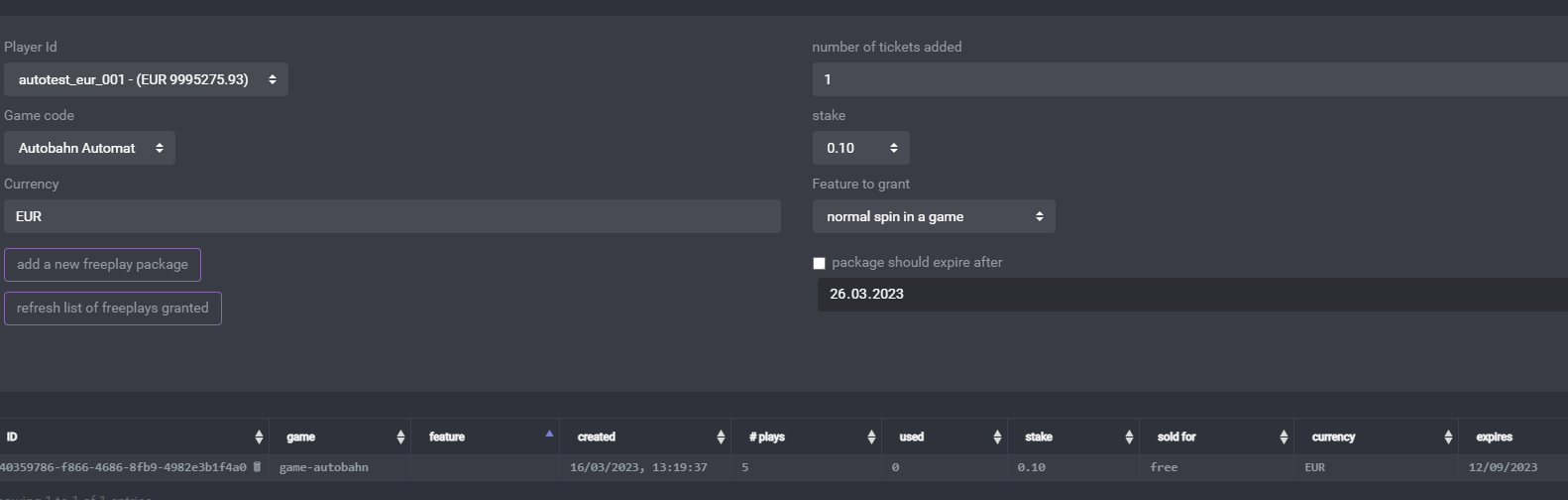
Select a player. Select the number of tickets (spins) to add. Select the currency and stake. Submit the package.